How to Get Free HTTPS Certificates via acme.sh?
- 时间:2020-10-09 18:35:39
- 分类:网络文摘
- 阅读:140 次
Let’s Encrypt provides HTTPS Certificates if you are already using CloudFlare which also manages/issues the free SSL certificates for you. However, with Let’s Encrypt, it is not so simple/trivial to get a free HTTPS ceriticate as you will need to verify your domain, and get the certificates and sometimes manually combine multiple certs (chain).
Some other organisations such as ZeroSSL offer 3 free certificates each up to 90 days before you have to pay them monthly (around 20 USD) to renew or get more certificates.
Easy HTTPS Ceriticates Issuing with ACME.sh
With acme.sh everything become so easy and simple to issue/renew the SSL Certificates. For more installation you can refer to github: https://github.com/acmesh-official/acme.sh
Step 1: Installation
1 | curl https://get.acme.sh | sh |
curl https://get.acme.sh | sh
After installation, there will be a daily crontab job to check the status of all the certificates that have been issued.
Step 2: Issue a Certificate
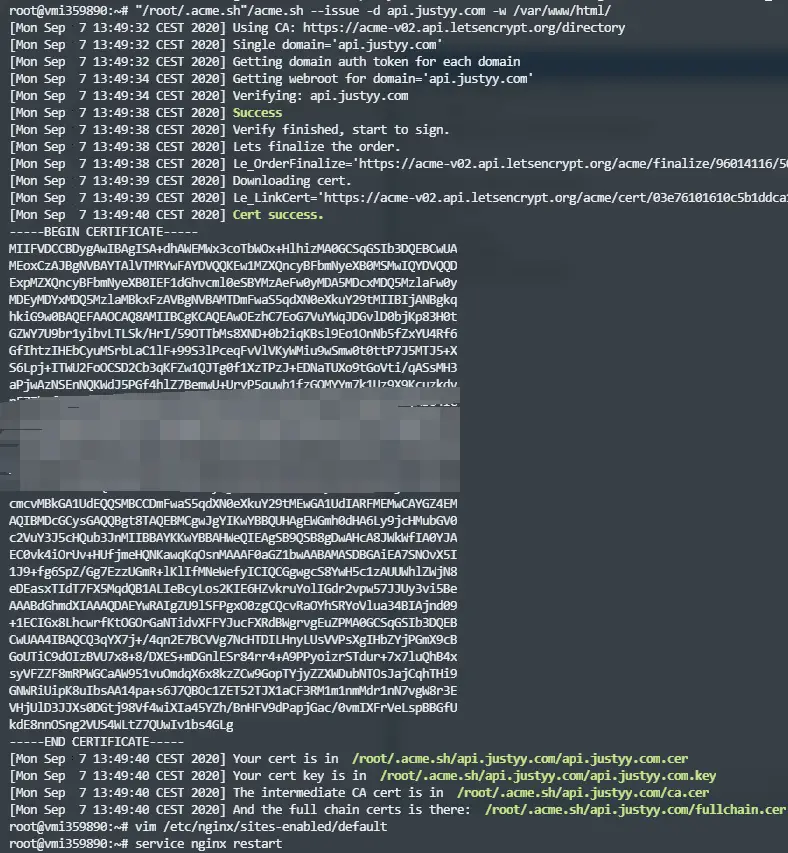
1 | "/root/.acme.sh"/acme.sh --issue -d api.justyy.com -w /var/www/html/ |
"/root/.acme.sh"/acme.sh --issue -d api.justyy.com -w /var/www/html/
I have issued a new SSL certificate for api.justyy.com here the -w parameter specifies the root folder – which could be Apache2 or Nginx (in order to verify the domain). Then after the HTTPS certificate has been issued – you would need to update the path in the Apache2 or Nginx config file to point to the new certs paths.
The Nginx default site configuration looks like:
1 2 3 | [email protected]:~# cat /etc/nginx/sites-enabled/default | grep acme ssl_certificate /root/.acme.sh/api.justyy.com/fullchain.cer; ssl_certificate_key /root/.acme.sh/api.justyy.com/api.justyy.com.key; |
[email protected]:~# cat /etc/nginx/sites-enabled/default | grep acme
    ssl_certificate /root/.acme.sh/api.justyy.com/fullchain.cer;
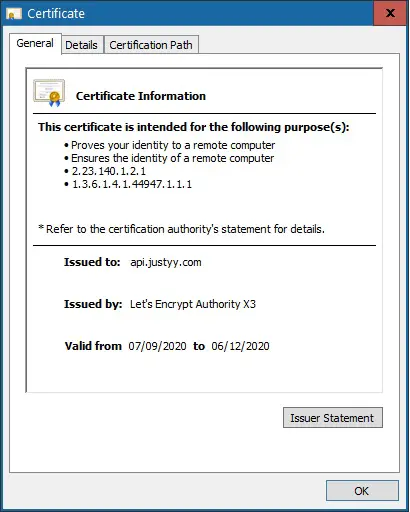
ssl_certificate_key /root/.acme.sh/api.justyy.com/api.justyy.com.key;And when we restart the nginx (or apache2) server, you will see the new Certificates issued (by checking the browser padlock).
Automatic Issue Renewal
There will be an entry in Crontab to check daily and renew your HTTPS certs – this is just awesome!
1 | 53 0 * * * "/root/.acme.sh"/acme.sh --cron --home "/root/.acme.sh" > /dev/null |
53 0 * * * "/root/.acme.sh"/acme.sh --cron --home "/root/.acme.sh" > /dev/null
Upon checking – it will show the following message:
1 2 3 4 5 6 7 | root@vmi359890:~/.acme.sh# "/root/.acme.sh"/acme.sh --cron --home "/root/.acme.sh" [Mon Sep 7 16:33:32 CEST 2020] ===Starting cron=== [Mon Sep 7 16:33:32 CEST 2020] Renew: 'api.justyy.com' [Mon Sep 7 16:33:32 CEST 2020] Skip, Next renewal time is: Fri Nov 6 12:44:10 UTC 2020 [Mon Sep 7 16:33:32 CEST 2020] Add '--force' to force to renew. [Mon Sep 7 16:33:32 CEST 2020] Skipped api.justyy.com [Mon Sep 7 16:33:32 CEST 2020] ===End cron=== |
[email protected]:~/.acme.sh# "/root/.acme.sh"/acme.sh --cron --home "/root/.acme.sh"
[Mon Sep  7 16:33:32 CEST 2020] ===Starting cron===
[Mon Sep  7 16:33:32 CEST 2020] Renew: 'api.justyy.com'
[Mon Sep  7 16:33:32 CEST 2020] Skip, Next renewal time is: Fri Nov  6 12:44:10 UTC 2020
[Mon Sep  7 16:33:32 CEST 2020] Add '--force' to force to renew.
[Mon Sep  7 16:33:32 CEST 2020] Skipped api.justyy.com
[Mon Sep  7 16:33:32 CEST 2020] ===End cron===
We can also run the following to install a certificate.
1 2 3 4 | "/root/.acme.sh"/acme.sh --install-cert -d api.justyy.com \ --key-file "/etc/nginx/ssl/key.pem" \ --fullchain-file "/etc/nginx/ssl/cert.pem" \ --reloadcmd "service nginx force-reload" |
"/root/.acme.sh"/acme.sh --install-cert -d api.justyy.com \
--key-file "/etc/nginx/ssl/key.pem" \
--fullchain-file "/etc/nginx/ssl/cert.pem" \
--reloadcmd "service nginx force-reload"
That tells acme.sh where to install the certs and tell it how to restart/reload apache2/nginx when HTTPS/SSL certificates are renewed. Please note after this, you have to modify the config to point to the new location of the certs installation path in this case /etc/nginx/ssl
–EOF (The Ultimate Computing & Technology Blog) —
推荐阅读:加减乘除应用题的具体类型 简单应用题和复合应用题概念 四则混合运算顺序 整数小数分数四则运算计算法则 小学学过的运算定律 分数四则运算的意义 小数四则运算的意义 整数四则运算的意义和各部分名称 数学中学过的性质和规律 小数分数百分数互相转化方法
- 评论列表
-
- 添加评论