The GOTO Keyword in LOGO Turtle Programming
- 时间:2020-10-12 15:56:23
- 分类:网络文摘
- 阅读:224 次
LogoTurtle is the first and currently only one Chrome Extension for Logo Programming. I personally use this tool to teach my sons the turtle graphics.
This is probably the first version of LOGO that supports GOTO keyword.
How to Install?
Chrome Webstore: https://chrome.google.com/webstore/detail/logo-turtle/dcoeaobaokbccdcnadncifmconllpihp. For Opera browsers, the workaround is to first install Chrome Extension Gadget. And similarly for Firefox, you can install Chrome Store Foxified before you install LogoTurtle.
The GOTO in Logo
Let’s see a example in using GOTO:
rt 10
goto @start
repeat [5 fd 100 rt 144]

@start
make "i 0

@hello
fd 100
rt 90
make "i :i+1
if :i<4  [goto @hello]

fd 100
You can define a label using @ symbol, the labels are case-sensitive. Once defined, you can use goto keyword to jump to that location whenever needed.
Scan the Source for Labels
The following Javascript code scans the LOGO source and put labels into a hash table – as long as it is not preceded with a goto keyword – see github src.
1 2 3 4 5 6 7 8 9 10 11 12 13 14 15 16 17 18 19 20 21 22 23 24 25 26 27 28 29 30 31 32 33 | scanForLabels(s, i, U) { let prev = ""; while (i < U) { // jump Comments and white spaces i = this.skipTo(s, i, U); if (i >= U) { break; } // get next word and next index let x = getNextWord(s, i, U); i = x.next; let word = x.word; if (word == '') { continue; } let lword = word.toLowerCase(); let y = getNextWord(s, i, U); let word_next = y.word; if ((lword[0] === '@') && (prev !== 'goto')) { // label if (lword.length == 1) { this.pushErr(word, LOGO_ERR_INVALID_LABEL); return false; } // save the (label, index) into the hash table const label = lword.substring(1); this.labels[label] = i; continue; } i = y.next; prev = word.toLowerCase(); } console.log("labels: ", this.labels); } |
scanForLabels(s, i, U) {
    let prev = "";
    while (i < U) {
        // jump Comments and white spaces
        i = this.skipTo(s, i, U);
        if (i >= U) {
            break;
        }
        // get next word and next index
        let x = getNextWord(s, i, U);
        i = x.next;
        let word = x.word;
        if (word == '') {
            continue;
        }
        let lword = word.toLowerCase();
        let y = getNextWord(s, i, U);
        let word_next = y.word;
        if ((lword[0] === '@') && (prev !== 'goto')) { // label
            if (lword.length == 1) {
                this.pushErr(word, LOGO_ERR_INVALID_LABEL);
                return false;
            }
            // save the (label, index) into the hash table
            const label = lword.substring(1);
            this.labels[label] = i;
            continue;
        }
        i = y.next;
        prev = word.toLowerCase();
    }
    console.log("labels: ", this.labels);
}Then, when we meet the goto keyword, we can quickly look up the index in the hash table – see github
1 2 3 4 5 6 7 8 9 10 11 12 13 14 15 16 | case "goto": if (!word_next.startsWith("@")) { // variable must be noted with double quotes this.pushErr(word, LOGO_ERR_INVALID_LABEL); return false; } // get the label name let label_1 = word_next.substring(1); // not a valid variable name if (!this.labels[label_1]) { this.pushErr(word, LOGO_ERR_INVALID_LABEL); return false; } // goto that index i = this.labels[label_1]; break; |
case "goto":
    if (!word_next.startsWith("@")) {
        // variable must be noted with double quotes
        this.pushErr(word, LOGO_ERR_INVALID_LABEL);
        return false;
    }
    // get the label name
    let label_1 = word_next.substring(1);
    // not a valid variable name
    if (!this.labels[label_1]) {
        this.pushErr(word, LOGO_ERR_INVALID_LABEL);
        return false;
    }
    // goto that index
    i = this.labels[label_1];
break; 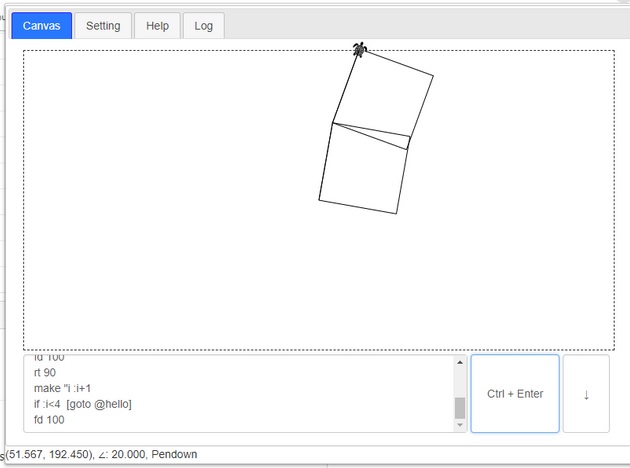
logo-goto-keyword
–EOF (The Ultimate Computing & Technology Blog) —
推荐阅读:第一缸原有金鱼多少尾 原计划五年级修复多少本 这只狗共奔跑了多少千米 有红黄两种颜色的小球共140个 元宵节观灯作文 一人饮酒醉 宛委山看樱花作文 总会有一个人是无可替代的。 不要畏惧痛苦作文900字 都是马虎惹的祸作文100字
- 评论列表
-
- 添加评论