How to Modify the Git Commit Messages After Your Push Your Branc
- 时间:2020-10-07 14:38:56
- 分类:网络文摘
- 阅读:146 次
Git is a popular and widely used version control system. If you stage your local changes and commit it to local branch, you can change the commit message by:
1 | git commit --amend "new message" |
git commit --amend "new message"
If you simply type without the message parameter:
1 | git commit --amend |
git commit --amend
Git will launch a text editor for you to change the commit message. You can edit and then save and exit (usually :wq for vim)
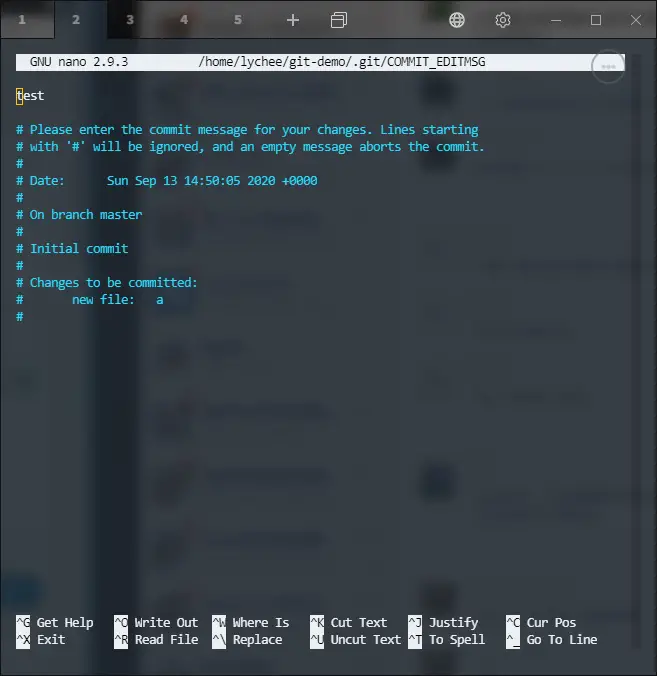
This command only allows you to amend the last commit – if you want to change multiple commit message you can git rebase
For example, you can change the last two commits:
1 | git rebase -i HEAD~2 |
git rebase -i HEAD~2
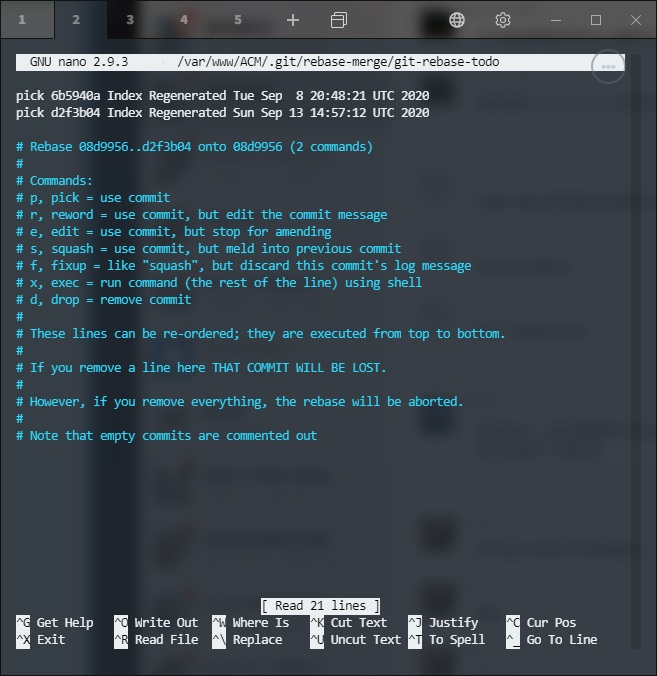
git-rebase-i-commit-message
Then, you can reword, drop, or squash commit messages. You can also exec to run external command for example if you want to reword to a multiline commit message.
Once you have done changing the commit messages, you can git push -f to remote branch.
If you have a messy branch, it is recommended that you git checkout -b NewBranch then git merge MessyBranch, then you can squash your commit message by git commit -m “Squashed new commit message”.
–EOF (The Ultimate Computing & Technology Blog) —
推荐阅读:保健养生:三种薯类食物健康食疗方 转基因食品推广需尊重消费者知情权 转基因食品试验不应是一场推销闹剧 管理总局曝光七个保健食品违法广告 预防湿疹复发可常吃清热祛湿食物 调和油乱象:市场价格和行业标准之乱 消费者该如何识别和选择食用油? 月饼是“三高”食品 六类人群不宜多吃 谁来保障转基因食品的公众知情权? 适宜老年人的秋令养阴滋补的菜肴
- 评论列表
-
- 添加评论