The Overlapping Rectangles using CSS and Javascript
- 时间:2020-09-20 13:49:13
- 分类:网络文摘
- 阅读:167 次
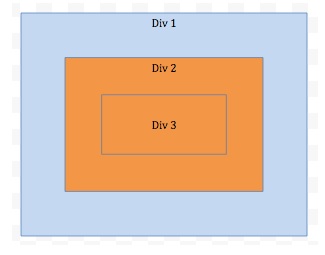
Make three rectangles as shown in the figure. Clicking on any rectangle should alert the name of the rectangle
Make three rectangles as shown in the above figure. Clicking on any rectangle should alert the name of the rectangle.
Three Rectangles in HTML Div Containers
The Three rectangles can be represented using HTML Div containers/elements. The outmost rectangle (also the biggest one) wraps the second biggest and so on.
1 2 3 4 5 6 7 | <div id="Div1"> <div id="Div2"> <div id="Div3"> </div> </div> </div> |
<div id="Div1">
  <div id="Div2">
    <div id="Div3">

    </div>
  </div>
</div>CSS
We can use the CSS to control how these rectangles look like e.g. the colour, the size etc.
1 2 3 4 5 6 7 8 9 10 11 12 13 14 15 16 17 18 19 20 21 22 23 24 25 26 | div { border-style: solid; border-color: grey; cursor: pointer; text-align: center; } div#Div1 { background-color: lightblue; width: 500px; height: 400px; } div#Div2 { background-color: orange; width: 400px; height: 300px; margin: 50px; } div#Div3 { background-color: transparent; width: 300px; height: 200px; margin: 50px; } |
div {
    border-style: solid;
    border-color: grey;
    cursor: pointer;
    text-align: center;
}

div#Div1 {
    background-color: lightblue;
    width: 500px;
    height: 400px;
}

div#Div2 {
    background-color: orange;
    width: 400px;
    height: 300px;
    margin: 50px;
}

div#Div3 {
    background-color: transparent;
    width: 300px;
    height: 200px;
    margin: 50px;
}Behavior in Javascript
Finally, we can use Javascript to define the clicking behaivor. We can define each Div’s onclick event but that is not an elegant solution as there will be duplicate code and you have to manually associate the behavior for each rectangle by ID explicitly.
1 2 3 4 5 6 7 8 | const divs = document.querySelectorAll("div"); for (let i = 0; i < divs.length; ++ i) { divs[i].addEventListener('click', function(i) { alert(divs[i].id); // avoid fired more than once for overlapping area event.stopPropagation(); }.bind(this, i)); } |
const divs = document.querySelectorAll("div");
for (let i = 0; i < divs.length; ++ i) {
    divs[i].addEventListener('click', function(i) {
        alert(divs[i].id);
        // avoid fired more than once for overlapping area
        event.stopPropagation();
    }.bind(this, i));
}The above Javascript will query all the Divs and add event listner (click) to each of them. Remember to call event.stopPropagation to avoid firing multiple events on the overlapping area.
Want to see how the above combines and works together in the JS playground?: https://jsfiddle.net/9mpjegL8/
–EOF (The Ultimate Computing & Technology Blog) —
推荐阅读:劲爆体育直播-劲爆体育在线直播观看「高清」 辽宁体育直播-辽宁体育在线直播观看「高清」 北京体育频道直播-北京体育在线直播观看「高清」 五星体育直播-五星体育在线直播观看「高清」 风云足球直播-风云足球在线直播观看「高清」 吉林篮球直播-吉林篮球在线直播观看「高清」 江苏体育直播-江苏体育在线直播观看「高清」 广州竞赛直播-广州竞赛频道在线直播观看「高清」 广东体育频道直播-广东体育频道在线直播观看「高清」 高尔夫网球频道直播-CCTV高尔夫网球在线直播「高清」
- 评论列表
-
- 添加评论