How to Create a Mock Echo Soap/REST API using SoapUI?
- 时间:2020-09-18 17:26:09
- 分类:网络文摘
- 阅读:158 次
Modern Applications Development often requires testing APIs. If you don’t have backend API developed, you can create Mock API services using SoapUI. You probably can do the same thing using PostMan, however which may require a premium subscription.
Creating Mocking API services help the Test Driven Development (TDD) where you can build the client first without worrying about the actual implementation of the server API.
Echo APIs are good. They are simple, and easy to implement. They will echo whatever is given (as parameter or the request body). For example, the API: https://helloacm.com/api/echo/?s=Hello! will echo a string Hello.
Creating a Mock Echo Get/Post API using SoapUI
Create a MockSerivce (either Rest of Soap), then add an Action. And then add a Mock Response.
In the response, click the script tab, and put the following to retrieve the querystring parameters of the Mock Request.
1 2 3 | def paramValue = mockRequest.getRequest().getParameter("value") context.paramValue = paramValue log.info "context.paramValue:" + context.paramValue |
def paramValue = mockRequest.getRequest().getParameter("value")
context.paramValue = paramValue
log.info "context.paramValue:" + context.paramValue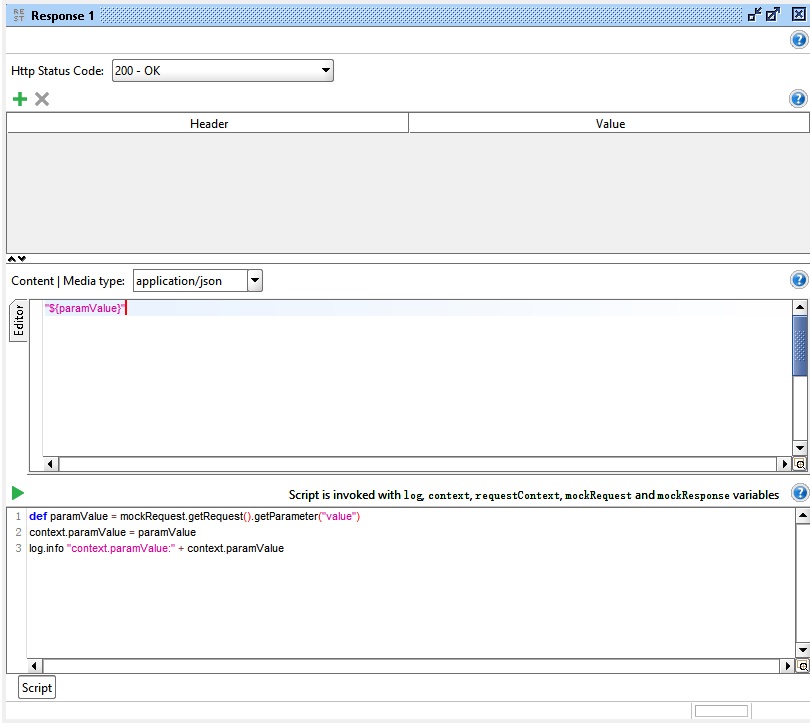
soapui-create-an-echo-mock-rest-api-get
The POST API allows you to retrieve the request Body. Copy over the below code in the script field of the Post API Response.
1 2 | def requestBody = mockRequest.getRequestContent() context.requestBody = requestBody |
def requestBody = mockRequest.getRequestContent()
context.requestBody = requestBody
With requestBody and paramValue variables defined in the script, we can use the dynamic values in the mock responses.
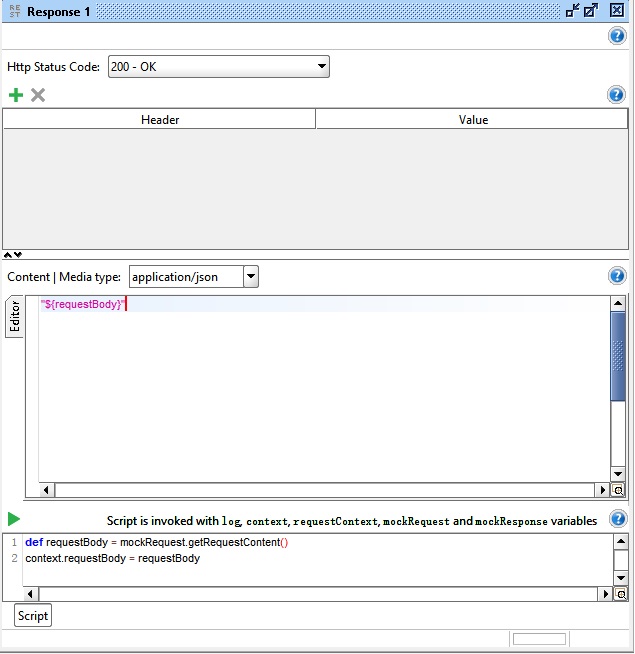
soapui-create-an-echo-mock-rest-api-post-get-requestcontent-requestbody
Once the Echo APIs are defined, we can start the APIs by clicking the green arrow button. The APIs will be running on port 8080.
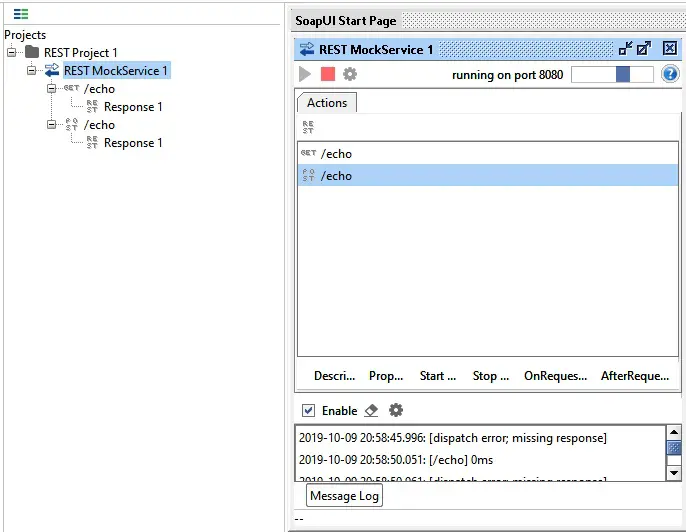
soapui-start-rest-mock-service-echo
Then, we can use the PostMan to send requests to test the above two Mock Echo APIs.
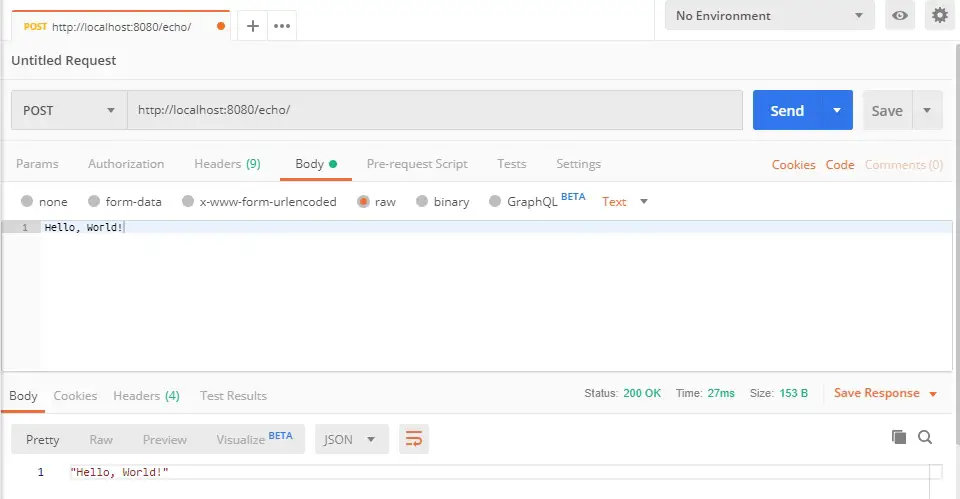
postman-sends-echo-request-api-via-post
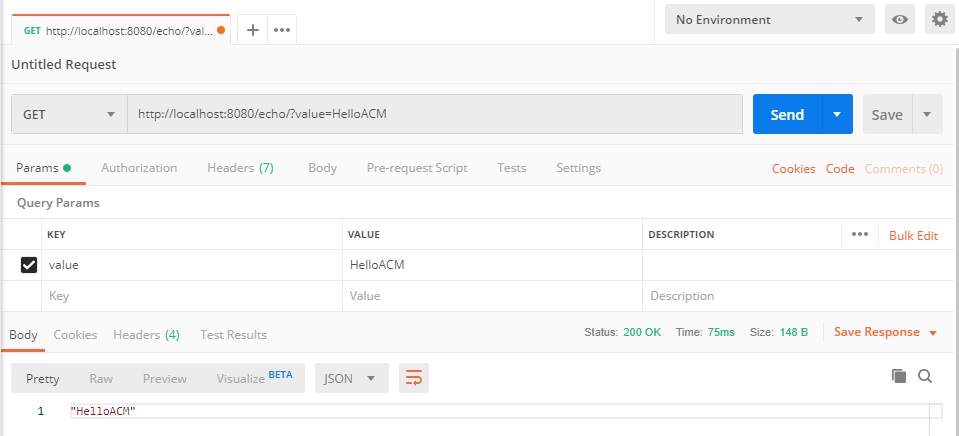
postman-sends-echo-request-api
The SoapUI allows you to create the dynamic APIs with dynamic responses. Below are some script to show the scripting capabilities.
1 2 3 4 5 6 7 8 9 10 11 12 13 14 15 16 17 18 19 20 21 22 23 24 25 26 27 28 29 30 31 32 33 34 35 36 37 38 39 40 41 42 43 | // Script dispatcher is used to select a response based on the incoming request. // Here are few examples showing how to match based on path, query param, header and body // Match based on path def requestPath = mockRequest.getPath() log.info "Path: "+ requestPath if ( requestPath.contains("json") ) { // return the name of the response you want to dispatch return "JSON Response" } // Match based on query parameter def queryString = mockRequest.getRequest().getQueryString() log.info "QueryString: " + queryString if ( queryString.contains("stockholm") ) { // return the name of the response you want to dispatch return "Response Stockholm" } else if( queryString.contains("london") ) { // return the name of the response you want to dispatch return "Response London" } // Match based on header def acceptEncodingHeaderList = mockRequest.getRequestHeaders().get("Accept-Encoding") log.info "AcceptEncoding Header List: " + acceptEncodingHeaderList if ( acceptEncodingHeaderList.contains("gzip,deflate") ) { // return the name of the response you want to dispatch return "GZiped Response" } // Match based on body def requestBody = mockRequest.getRequestContent() log.info "Request body: " + requestBody if ( requestBody.contains("some data") ) { // return the name of the response you want to dispatch return "Response N" } |
// Script dispatcher is used to select a response based on the incoming request.
// Here are few examples showing how to match based on path, query param, header and body

// Match based on path
def requestPath = mockRequest.getPath()
log.info "Path: "+ requestPath

if ( requestPath.contains("json") ) {
    // return the name of the response you want to dispatch
    return "JSON Response"
}

// Match based on query parameter
def queryString = mockRequest.getRequest().getQueryString()
log.info "QueryString: " + queryString

if ( queryString.contains("stockholm") ) {
    // return the name of the response you want to dispatch
    return "Response Stockholm"
}
else if( queryString.contains("london") ) {
    // return the name of the response you want to dispatch
    return "Response London"
}

// Match based on header
def acceptEncodingHeaderList = mockRequest.getRequestHeaders().get("Accept-Encoding")
log.info "AcceptEncoding Header List: " + acceptEncodingHeaderList

if ( acceptEncodingHeaderList.contains("gzip,deflate") ) {
    // return the name of the response you want to dispatch
    return "GZiped Response"
}


// Match based on body
def requestBody = mockRequest.getRequestContent()
log.info "Request body: " + requestBody

if ( requestBody.contains("some data") ) {
    // return the name of the response you want to dispatch
    return "Response N"
}API Testing Tools Software Download
PostMan: https://www.getpostman.com
SoapUI: https://www.soapui.org
Example SoapUI Project of Mock Echo APIs
The SoapUI project containing the above Echo APIs: GET and POST can be downloaded here: https://helloacm.com/static/soapui-rest-echo.xml
–EOF (The Ultimate Computing & Technology Blog) —
推荐阅读:诗词名句鉴赏:忧艰常早至,欢会常苦晚。 春王正月原文及翻译 诗词名句鉴赏:风萧萧兮易水寒,壮士一去兮不复还! 申胥谏许越成原文及翻译 诸稽郢行成于吴原文及翻译 诗词名句鉴赏:秋风起兮白云飞,草木黄落兮雁南归。 王孙圉论楚宝原文及翻译 根据营业额算税款 根据税款算收入的数学问题 鸡兔同笼变式题
- 评论列表
-
- 添加评论