How to Re-Number the Files Sequentially on Windows using Batch P
- 时间:2020-09-18 17:26:09
- 分类:网络文摘
- 阅读:169 次
You probably have a list of files e.g. camera pictures that you want to re-number sequentially. For example, the photos are named using dates-and-time string.
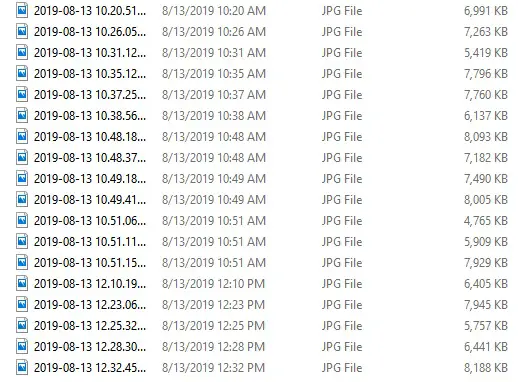
image-list-with-dates
However, this is not idea, as many of us want to re-name the files sequentially and possibly with a prefix.

images-re-numbered
Using the batch script below, we can easily rename all files in the same folder sequentially.
1 2 3 4 5 6 7 8 9 10 11 | @echo off REM rename-tool.cmd setlocal enabledelayedexpansion set num=1 for %%f in (*.%2) do ( ren "%%f" "%1!num!.%2" rem increment the numbering set /a num=!num!+1 ) endlocal |
@echo off
REM rename-tool.cmd
setlocal enabledelayedexpansion

set num=1
for %%f in (*.%2) do (
    ren "%%f" "%1!num!.%2"
    rem increment the numbering
    set /a num=!num!+1
)
endlocal
Example usage:
1 | rename-tool myfiles- jpg |
rename-tool myfiles- jpg
The first parameter is the prefix, and the second parameter the file suffix (extension). The above batch script may fail to rename some files if the target file exists, thus it is better to choose a different prefix when first time renaming all the files in the folder.
–EOF (The Ultimate Computing & Technology Blog) —
推荐阅读:Content Ideas for New Blogs During the Pandemic ‘Labeled For Reuse’ Gone: The Latest Disarming Change on Google Blogging Magnates and Their Incredible Wealth Join this Niche: Inspirational Charitable and Non-Profit Blogs 7 Passive Income Ideas to Complement Your Blog Funny YouTuber Creates Device to Shoot Facemasks To Your Face YouTube’s New “Viewer Applause” Feature Provides Revenue for Blo Taiwanese Instagram Grandparents Prove Blogging and Social Media These Incredible Hologram Machines Could Change the Vlogging Gam Prepare All Keyboard Warriors: A TikTok and Twitter Merger is Ab
- 评论列表
-
- 添加评论