Using the stdout to debug print the solution in the leetcode con
- 时间:2020-09-07 12:03:44
- 分类:网络文摘
- 阅读:184 次
The leetcode web coding IDE has a premium debugger feature – however this is not enabled during the contest. Recently I found out that you can actually print to STDOUT and then when you run your solution – you will see the output – this is an easy yet powerful method to debug when you don’t have other better solutions.
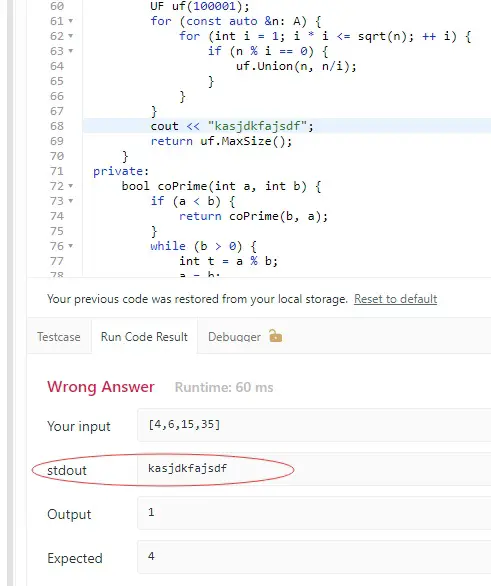
leetcode-stdout-debugging-trick
This is a great way to debug your code when you don’t have a IDE at hand – sometimes I participated the weekly contests on iPad where I don’t have IDE and I don’t have access to the inbuilt leetcode debugger as well – in this case, the printing to stdout is the only practical way of debugging printing the variables. Prior to this, I can only change the code and return the variable as a debugging technique – which is very inefficient.

leetcode
–EOF (The Ultimate Computing & Technology Blog) —
推荐阅读:15届华罗庚金杯少年数学邀请赛初赛试题及解答 15届华杯赛初赛试题解析(二) 15届华杯赛小学初赛试题解析(三) 数学家苏步青的自述 关于负数的知识 第15届华杯赛决赛小学组试题解析一(A卷) 第15届华杯赛决赛小学组试题解析二(A卷) 为什么生活中有那么多圆柱体? 石头的体积 梅文鼎与抽屉原理
- 评论列表
-
- 添加评论